
Mobile Link for Generators
Generac Power Systems, IncLifestyle
4.63.67K Reviews
- Version
- 3.17.0
- Installs
- 500.00K
- Age Rating
- Everyone
Screenshots
Our Review of Mobile Link for Generators
 Analysis by Appyee
So, I recently got my hands on an app that's been causing quite a buzz in the generator community: Mobile Link for Generators. Now, if you're someone who relies on generators for backup power, you know the struggle of keeping tabs on them, especially when you're away. This app promises to make your life a whole lot easier by allowing you to monitor and manage your generator directly from your phone. I decided to dive in and see if it really delivers on its promises.
Who benefits most from checking in remotely
I see the strongest case for Mobile Link in homes where a generator is genuinely part of the backup plan, rather than equipment that sits unused and forgotten. If you travel, own a second property, or simply cannot be beside the generator when the power goes out, a phone-based status check can help you decide whether to investigate or ask someone nearby to take a look. It is less compelling if you rarely use the equipment and are happy to inspect it in person.
A practical habit is to open the app before a trip and confirm that the generator appears as expected, then keep alerts enabled while you are away. That does not replace preparing the equipment or arranging local help; it gives you another way to notice when attention may be needed. I would treat notifications as prompts to check the situation, not as proof that every part of a backup-power plan is working.
For a small business or a property with more than one generator, having units accessible in one place may be more useful than it is for a single-device household. The value is organizational: instead of relying on memory to check each machine, you can review the equipment through the same app. If you manage generators owned by different people or need formal maintenance records, though, I would first make sure the app's available account and service workflow match how your operation is organized.
First Impressions: Setting Up
Getting started with Mobile Link for Generators was a breeze. After downloading the app, you’ll need to create an account and link it to your generator. The setup process is surprisingly straightforward, with step-by-step instructions that even my tech-challenged friend could follow. The app uses your generator's serial number to establish a connection, and voilà, you’re in! It’s compatible with both Android and iOS, which is a nice touch for households with mixed devices.
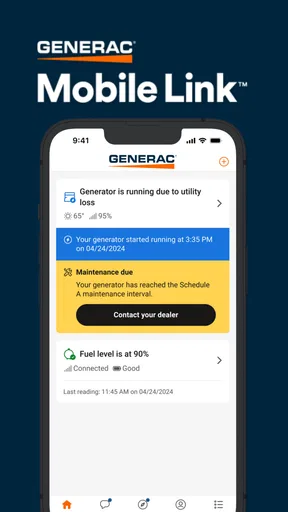
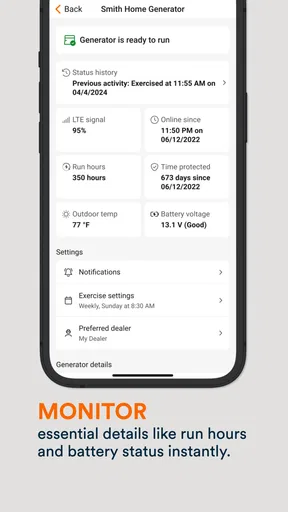
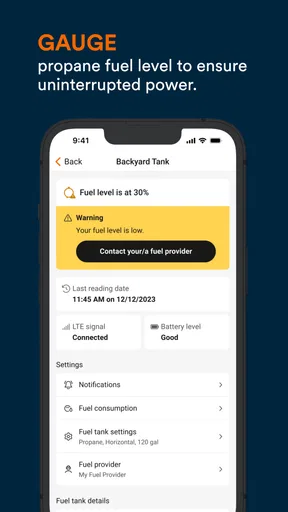
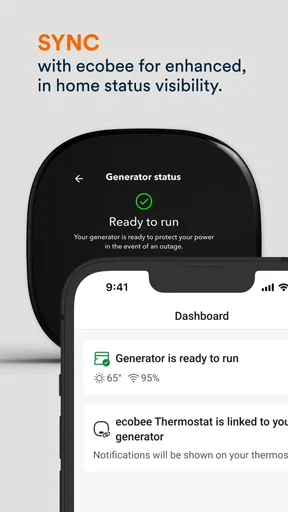
Once I logged in, I was greeted with a sleek and intuitive interface. The dashboard is clean, with all the essential information right at your fingertips. You can immediately see the generator status, fuel level, and maintenance schedules. It’s like having a personal assistant for your generator!
Features That Stand Out
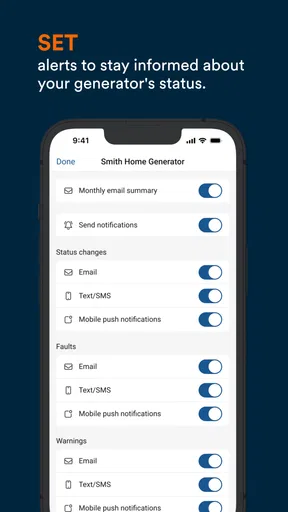
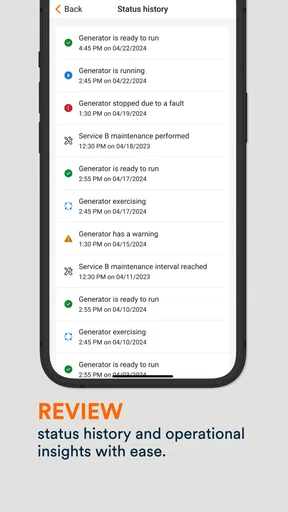
What really sets Mobile Link apart are its real-time alerts. You get notified about any issues or if the generator starts running. This feature is a game-changer, especially during a power outage when you’re not home. Imagine being at work and getting a notification that your generator has kicked in—peace of mind at its finest!
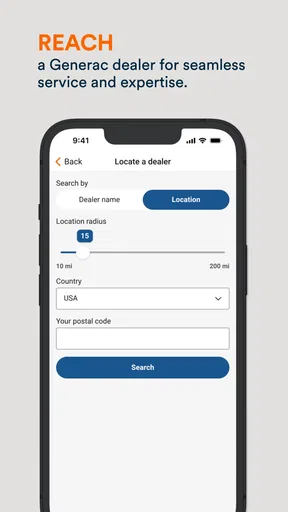
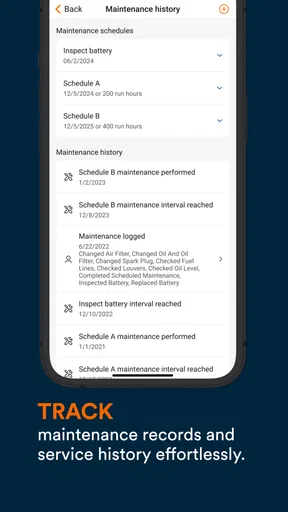
Another nifty feature is the maintenance reminders. The app tracks your generator's runtime and alerts you when it’s time for a check-up. No more guesswork or digging through manuals; everything you need is in the palm of your hand. Plus, you can even schedule service visits directly through the app.
Making alerts useful rather than noisy
One useful way to think about alerts is as a reason to make a decision, not a substitute for one. If a message arrives while you are out, consider whether someone can safely check the property and whether the issue needs a service visit. That simple plan makes the phone notification more actionable than repeatedly checking the dashboard without knowing what you would do with a change in status.
Maintenance reminders can also help turn occasional monitoring into a routine. I would use them alongside the owner's manual and any service arrangements already in place, rather than assuming an app reminder covers every inspection or task. Before relying on the app for a critical reminder, make sure notifications are allowed on your phone and that the generator is still connected to your account.
Performance and Usability
In terms of performance, the app is quite responsive. I didn’t experience any lags or crashes, and the notifications came through promptly. The app also supports multiple generators, which is perfect for businesses or large properties. You can switch between different units seamlessly, and the app provides detailed insights for each one.
One thing I did notice is that the app requires a stable internet connection to function correctly. If your Wi-Fi is spotty, you might experience some delays in receiving updates. But as long as you have a decent connection, you’re good to go.
What remote monitoring can and cannot replace
Compared with the usual alternatives—walking out to inspect the equipment, keeping notes on a calendar, or asking someone on site to report back—Mobile Link brings status and reminders together on a phone. That convenience is its central advantage. A notebook can still be better for recording a detailed maintenance history, while a local inspection remains the sensible choice when you need to assess the equipment physically. I would use the app to stay informed between those checks, not to eliminate them.
Connectivity is the most important trade-off. If the property has unreliable internet, or if you often travel through areas where you cannot check your phone, remote updates may be less dependable as part of your routine. In that situation, an agreed local check-in plan is more useful than assuming an app can keep you informed. The app makes remote oversight easier when the connection is there; it does not remove the need for a backup plan when it is not.
Mobile Link is a lifestyle app from Generac Power Systems, Inc, designed around the specific job of keeping tabs on a compatible generator. It is free to download, has an Everyone age rating, and its current version is 3.14.0. The app has a 4.5 average from around 20,000 ratings and over 100,000 installs. Those figures suggest a well-established audience, but I would still judge it by whether it fits your generator and your connectivity needs.
Is It Worth It?
Now, let’s talk about the elephant in the room: cost. The app offers a free version with basic features, but to unlock its full potential, you’ll need a subscription. The premium version is where the magic happens, offering advanced monitoring and control options. While some might balk at the idea of paying for an app, the peace of mind and convenience it provides are worth it, especially if you rely heavily on your generator.
Because the app is free to download but includes in-app purchases ranging from $3.39 to $149.99 per item, I would check the options shown in the app before deciding whether any paid feature is worthwhile. I would not assume that every household needs an upgrade: someone who mainly wants a basic status check may have different needs from someone monitoring several units. The right question is whether the particular service or capability you want is included for your account, and whether its ongoing usefulness justifies the cost.
One point worth checking before setup is the generator itself. The app is intended to connect to a generator, so a download alone does not create a useful monitoring setup. Have the serial number available, follow the account-linking steps, and confirm that the unit appears in the dashboard. If it does not, I would resolve that connection first rather than relying on alerts or reminders that depend on having the equipment linked.
The app has been available since February 26, 2014, and its current release is 3.14.0. That gives existing users a reason to consider the product as an evolving tool rather than a one-off download, but a version number by itself does not tell me what changed in a particular update. Before updating, I would check the app's current release notes and make sure I can still sign in and see my generator afterward. For someone already using it, the practical test is whether the current dashboard and alerts continue to support their routine.
For a homeowner who wants a remote view of a linked generator, or a property manager who needs to keep an eye on several units, I think the app has a clear purpose. It is less suited to someone without a compatible connected setup, someone who wants a general home-energy dashboard, or anyone expecting remote monitoring to work independently of internet access. Those readers may be better served by direct inspection, a local person checking the equipment, or a broader tool that fits their existing system.
Overall, Mobile Link for Generators is a must-have for anyone looking to simplify their generator management. Its user-friendly design, real-time notifications, and comprehensive monitoring capabilities make it a standout choice. If you’re tired of manually checking your generator or worrying about unexpected outages, this app is definitely worth considering.
So, there you have it—a deep dive into Mobile Link for Generators. Whether you’re a homeowner or a business owner, this app could be a game-changer for your backup power needs. Give it a shot, and you might just wonder how you ever managed without it!
Verdict
Strengths of Mobile Link for Generators
- Provides real-time monitoring of generator status.
- Easy setup with user-friendly interface.
- Remote start and stop functionality.
- Alerts and notifications for maintenance needs.
- Compatible with multiple generator models.
Limitations of Mobile Link for Generators
- Limited features in the free version.
- Requires stable internet connection.
- App updates can be infrequent.
- May drain battery quickly if used continuously.
- Occasional connectivity issues reported.
Similar Picks in This Category
View All
SmartThings
Samsung Electronics Co., Ltd.4.6

Google Home
Google LLC4.0

Pinterest4.2

Astrotalk - Talk to Astrologer
Astrology & Horoscope4.7

My Verizon
Verizon Consumer Group4.5

Samsung Wallet (Samsung Pay)
Samsung Electronics Co., Ltd.4.1
Frequently Asked Questions
What is Mobile Link for Generators?
Mobile Link for Generators is a monitoring application designed to provide real-time updates and control over your generator. It allows users to check the status, receive maintenance alerts, and manage settings remotely through their smartphone. This app is compatible with select generator models, enhancing convenience and reliability.
How do I connect my generator to Mobile Link?
To connect your generator to Mobile Link, you'll need a compatible generator with a Mobile Link device installed. Once the device is set up, download the app on your smartphone, create an account, and follow the in-app instructions to pair it with your generator. Ensure your device has a stable Wi-Fi connection for seamless operation.
What features does Mobile Link offer?
Mobile Link offers a range of features including real-time status updates, maintenance alerts, and historical data tracking. Users can start or stop the generator remotely, receive notifications about performance issues, and access customer support directly through the app. It also provides detailed reports for maintenance scheduling.
Is Mobile Link compatible with all generator brands?
Mobile Link is specifically designed for certain generator models and brands. It is important to check compatibility with your specific generator model before downloading the app. Compatibility details can usually be found on the manufacturer’s website or within the app description on the download page.
Are there any subscription fees for using Mobile Link?
Mobile Link may offer both free and subscription-based plans. While basic monitoring and alerts might be available for free, advanced features such as detailed reports and enhanced customer support could require a subscription. It's advisable to review the app’s pricing details to understand what features are included in each plan.
